Google

Locations of visitors to this page

Hosted by:
SourceForge

wrapper.ntservice.password Property
Configuration Property Overview
wrapper.ntservice.password

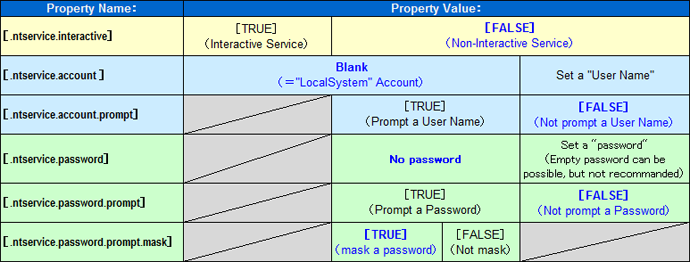
The password of the account specified in wrapper.ntservice.account. If the account does not have a password, or if the LocalSystem account is being used, then this value can be blank. The default is no password.

Example:
wrapper.ntservice.password=secret

NOTE

Changes to this property will not take effect until the service is reinstalled.

It is possible to use accounts that do not have a password set by simply setting the password to an empty string or ommitting the property all together.

Example:
wrapper.ntservice.password=

NOTE

Under Windows XP and Windows 2000 SP3 and above, by default, the system will not allow services to be run for accounts which do not have a password set.

To make it possible to run as an account without a password, you need to disable the "Accounts: Limit local account use of blank password to console logon only." setting. Go to the Administrative Tools folder in your control panel. Open the Local Security Policy applet. Expand Local Policy and then click on Security Options. On the right side you will find the above setting. Right click to access its properties dialog and then disable it.

Note that the Local Security Policy applet does not appear to be available on Home versions of Windows 2000 and XP. It is thus not possible to run a service as a specific account under those versions of Windows.

Some users have expressed concern about having a plain text password stored in the wrapper.conf file. There are a few options available for avoiding this problem. The wrapper.ntservice.password is not required once the Wrapper has been installed as a service.

  • The most obvious solution is to simply delete the property from the wrapper.conf file after the service has been installed. This has the obvious drawback of requiring a user to manually modify the file.

  • Another option is to create a second configuration file called password.conf as follows:

    password.conf
    wrapper.ntservice.password=secret

    The actual wrapper.conf file is then modified to include the password file rather than declaring the property directly:

    wrapper.conf
    wrapper.ntservice.name=myapp
    wrapper.ntservice.account=myuser
    #include ../conf/password.conf

    See the Cascading Configuration Files page for a full explanation of how include files work. The key point is that they are optional, meaning that once the wrapper has been installed as a service, the password file can simply be deleted.

  • A third option is to modify the batch file used to install the Wrapper so that it prompts the user for a password and then installs the Wrapper using the following command.

    Wrapper.exe -i ..\conf\wrapper.conf wrapper.ntservice.password=%PASSWORD%

    Versions prior to 3.2.0 would store all properties specified in the command line within the registry in plain text. This security hole has been fixed by special casing the wrapper.ntservice.password property and omitting it from the values stored in the registry.

  • A fourth option is to have the Wrapper prompt the user for a password when installing the Wrapper as a service using the wrapper.ntservice.password.prompt property described below.

wrapper.ntservice.password.prompt

If set, the wrapper.ntservice.password.prompt property will cause the Wrapper to ignore any value specified with the wrapper.ntservice.password property and then prompt the user for a password when installing as a service. This has the benefit of being secure in that the password is never recorded anyplace other than within the Windows Service Manager. The default is FALSE.

Example:
wrapper.ntservice.password.prompt=TRUE

When the Wrapper is launched with the -i command, the Wrapper will display the following to the console, prompting the user for an account password. This example assumes that the wrapper.ntservice.account property is set to ".\wrapper".

Example:
Please input the password for account '.\wrapper':
wrapper.ntservice.password.prompt.mask

By default the Wrapper will mask a password being entered at a password prompt. Setting the wrapper.ntservice.password.prompt.mask property to false will cause the password to be visible in the console. The default is true.

Example:
wrapper.ntservice.password.prompt.mask=FALSE


User Comments

If you notice something that is incorrect, missing, or simply feel that some part of this page could be explained better, feel free to log in and add a comment. You will need to register before you can log on.

Email:
Password:
by Brian Brooks (2005/09/27 23:05:51 JST from 209.195.52.120)
Gravatar

For some more DOS scripting tips see
WindowsXP->Start->Help->Command shell overview->Using batch files->Using batch parameters

by Brian Brooks (2005/09/27 22:44:11 JST from 209.195.52.120)
Gravatar

The downside I've experienced with the third option is that when I modify the wrapper.exe -i line in %WRAPPER_HOME%srcinInstallApp-NT.bat.in to something like

"%_WRAPPER_EXE%" -i %_WRAPPER_CONF% wrapper.ntservice.account=%LOG_ON_AS% wrapper.ntservice.password=%PASSWORD%

then wrapper.exe adds the cleartext password to the NT service's->Properties->Path to executable. I don't know if this behavior is a defect or "feature".

Thus, if you don't want any cleartext record of the password, you have to use option 1 or 2. Option 3 isn't secure.

by Brian Brooks (2005/09/21 05:28:19 JST from 209.195.52.120)
Gravatar

Under Windows 2000, you can prompt a user for a password with something like

SET /P some_variable_name="some prompt for LogOnAs user password: "

I found this tidbit at Rob van der Woude's great web site "Scripting Pages: Batch Files, Rexx, KiXtart, Perl, VBScript"

http://www.robvanderwoude.com/index.html

last modified: