In general, an application should run as fast under the Wrapper as it does when running standalone.
Here are a few places to start looking.
Console Output
On some platforms, including Windows, sending large quantities of text to
System.out or System.err
will cause the program to slow down.
This is because all of that output is being rendered to the screen in a GUI environment.
This is actually the OS eating the CPU rather than the Wrapper or your application,
but the end result is the same.
To significantly reduce this effect, use a logging tool that will output to a file rather than to stdout.
By doing so, the output is never sent to the Wrapper or the user console and it results in reducing the burden.
Another option, which is almost as good, is to configure the Wrapper's console log level,
using the wrapper.console.loglevel property,
so that the output is only sent to the Wrapper's log file.
Console output is disabled by default when running as a Windows Service
and the console has not been enabled.
Memory
Make sure that your system has plenty of physical memory for the JVM to run
without doing any disk swapping (virtual memory on hard disk).
Because of the way Java manages memory, a very significant speed hit is common simply
because Java is forced to do paging of large amounts of its memory
as it attempted to perform "garbage collection".
I am getting an error that the Wrapper cannot load its native library.
A few users have asked about the following message showing up
in their wrapper.log file:
WrapperManager: ERROR - Unable to load the Wrapper's native library because none of the
WrapperManager:         following files:
WrapperManager:           wrapper-windows-x86-64.dll
WrapperManager:           wrapper.dll
WrapperManager:         could be located on the following java.library.path:
WrapperManager:           E:\myworkspace\tortoise\wrapper\wrapper_3.5.x\professional\bin\..\lib
WrapperManager:         Please see the documentation for the wrapper.java.library.path
WrapperManager:         configuration property.
This message is being shown because the Java component of the Wrapper was unable to load its
native libraries during initialization.
If you look in your wrapper.conf file,
you will see a property, wrapper.java.library.path.
This property is used to specify the directory that the Wrapper will look in to find its native library
(Windows: wrapper.dll, Linux/UNIX: libwrapper.so).
You should place the library file in the specified directory
or change the property to point to the directory where the library is located.
If you are using the Delta Pack, make sure that the library corresponding to your platform is located in the specified directory.
My application does not start. What can I do to narrow down the problem?
Output describing the problem should be displayed in the console,
as well as the configured log file.
To get more detailed output,
edit your wrapper.conf file and
enable debugging by uncommenting the wrapper.debug property.
This will display very detailed output at every step in the process of launching and monitoring your application.
If your application works when not using the Wrapper, but fails with the Wrapper,
then it is very likely that there is a problem in the way you set up your wrapper.conf file.
Please look closely at the command used to launch Java in the debug output.
It is possible that there is a mistake in the classpath or something.
I am not getting any output in my configured log file.
It is possible that the Wrapper is not able to locate the specified Wrapper configuration file,
or it is not able to open the configured log file for some reason.
In either case, the Wrapper will log output to
a file called wrapper.log
in the current working directory.
The current working directory will most likely be the directory containing the binary.
However, in some cases, when running as a Windows Service, the
wrapper.log file
may be placed in your system directory (WinNT\System32).
My application is hanging while it is shutting down.
If you call System.exit() in your application,
then the Wrapper will catch this and attempt to shutdown the application cleanly.
If during the shutdown process your application once again calls System.exit(),
then the call will block indefinitely, causing your application to hang.
There are also problems with calling the destroy() method
on an AWT frame or window from within a Shutdown Hook thread.
Please take a look at the
wrapper.disable_shutdown_hook property
in the Configuration Overview for details on how to avoid this problem.
My JVM hangs when shutting down after doing a thread dump.
The problem is that you might set the
wrapper.java.command
property to a batch file rather than directly to java.exe.
When requesting a thread dump, the "BREAK" signal is being sent to
the process command.exe/shell rather than the Java process.
It then forwards the signal on to the JVM, but also sets an internal flag that CTRL-C has been pressed.
Before the Java process exits, it asks the user if they wish to stop or continue the batch script.
INFO   | jvm 1    | 2009/10/23 14:30:35 | WrapperManager Debug: Sent a packet STOPPED : 0
INFO   | jvm 1    | 2009/10/23 14:30:36 | Terminate batch job (Y/N)?
ERROR  | Wrapper  | 2009/10/23 14:30:56 | Shutdown failed: Timed out waiting for the JVM to terminate.
ERROR  | Wrapper  | 2009/10/23 14:30:56 | JVM did not exit on request, terminated
STATUS | Wrapper  | 2009/10/23 14:30:57 | <-- Wrapper Stopped
If you are needing to do some additional processing before or after
the JVM is launched, the Java Service Wrapper Professional edition has the ability to do
exactly that: Wrapper Event Configuration.
I can't use the API call WrapperManager.requestThreadDump (Error 0x57)
This problem is similar and caused by the same reason as the previous mention above.
INFO | jvm 1 | 2009/10/23 14:35:48 | WrapperJNI Error: Unable to send BREAK event to JVM process: The parameter is incorrect. (0x57)
If you are needing to do some additional processing before or after
the JVM is launched, the Java Service Wrapper Professional edition has the ability to do
exactly that: Wrapper Event Configuration
JBoss 6.* is outputting lots of "ERROR: Error installing to..." Errors at start-up when running with the Wrapper
INFO   | jvm 1    | 2011/01/06 17:23:05 | ERROR: Error installing to Configured: name=ServiceBindingManager state=Configured
INFO   | jvm 1    | 2011/01/06 17:23:05 | java.lang.Exception: Error calling callback JMXRegistrationAdvice for target context ServiceBindingManager
...
JBoss with version 6 is utilizing internally a MBeanServer Factory based on
org.jboss.system.server.jmx.MBeanServerBuilderImpl,
however, this one is incompatible to the default
JVM MBeanServerBuilder (javax.management.MBeanServerBuilder).
There are 2 options available to resolve this.
First option is to disable the Wrapper's MBeans from getting registered.
For this option, please take a look at Integration Method 1.
The second option is to tell the JVM to use the MBeanServer Factory that JBoss is using.
More information about this can be found on the JMX Page.
The Wrapper is reporting an error/warning about its signature when starting.
wrapper  | A signature was found in "C:\wrapper-windows-x86-64-3.5.54-pro\bin\wra
pper.exe", but checksum failed: (Errorcode: 0x800b010a)
A certificate chain could not be built to a trusted root authority. (0x800b010a)
wrapper  |   Signer Certificate:
wrapper  |     Serial Number:
wrapper  |       00 bf de 76 64 f1 1a d5 f3 dd af a7 e4 d7 c7 0f 5e
wrapper  |     Issuer Name: Sectigo RSA Code Signing CA
wrapper  |     Subject Name: Tanuki Software Ltd.
wrapper  |   TimeStamp Certificate:
wrapper  |     Serial Number:
wrapper  |       39 4c 25 e1 7c a0 6d 27 a8 65 e2 3b d9 1d 22 d4
wrapper  |     Issuer Name: Sectigo RSA Time Stamping CA
wrapper  |     Subject Name: Sectigo RSA Time Stamping Signer #4
wrapper  |     Date of TimeStamp: 2023/05/12 06:24:23
wrapper  | The Wrapper will shutdown!
Starting with Wrapper version 3.5.7, the Windows binaries (i.e.
wrapper.exe, wrapperW.exe and wrapper.dll)
of all Wrapper Editions (Community, Standard, Professional) are code signed to verify that they originate from Tanuki Software.
Starting with Wrapper version 3.5.28, the Wrapper is signed with a SHA-2 certificate that provides stronger security than the previously used SHA-1 algorithm. The decision to change the certificate was made in compliance with Microsoft's SHA-1 deprecation plan, which states that Windows 7 and higher will no longer support SHA-1 after January 1st, 2016.
The above error occurs when the certificates provided by our counter-signer 'Sectigo' are not correctly installed.
The certificates should be installed in a store that is accessible from the account on which the Wrapper is running. When the Wrapper is running as a console application, this may be the current user. When running as a service, it should be accessible from the service account that it uses. An alternative to this is to install the certificate to the local machine so that it is accessible in both modes.
The installed certificates can be investigated from the Windows Certificate Manager certmgr.msc (for the current user) or mmc (for any user).
To manage the certificates of a specific account, please launch 'mmc' from the Windows Run search box. On the File menu, click 'Add/Remove Snap-in' and double click on 'Certificates'. You can then choose to either manage certificates of the current user, of a service account or of the computer account. In the case of the service account, a list will appear with all services installed on the computer. Please select the account that was used when installing the Wrapper as a service.
To download the certificates please open the following page:
The links to the certificates can be found under the "Code Signing - Intermediate" section. Please use the 'Standard' ones.
For Wrapper version 3.5.46 and above, you may use the 'Standard' links under 'For Code Signing Certificates, issued on or after June 1, 2021'.
Both the 'Sectigo Public Code Signing CA R36' and 'SectigoPublicCodeSigningRootR46_AAA [ Cross Signed ]' links work with the Wrapper. For a detailed explanation of what root, intermediate or cross-signed certificates are, please read the following page of the Sectigo website:
To install the certificates for the current user or the local computer, you may simply execute the .crt file and follow the installation steps.
To import them to a service user, use 'mmc', add the snap-In as described above, select any store (marked with a folder icon) under this snap-In on the left panel, and from the menu click on 'Action > All tasks > Import' (Choose the option to "Automatically select the certificate store based on the type of certificate").
If the error is still showing, this might mean that the Local Security Policy of the server is too strict to allow the certificates to be verified. This settings can be found in the Local Security Policy of the server.
Launch 'secpol.msc' from the Windows Run search box, click on "Public Key Policies", then "Certificate Path Validation Settings". Under the 'Stores' tab, make sure that "Third-Party Root CAs and Enterprise Root CAs" is checked if policy settings are defined.
If this doesn't/can't be set to active, another option would be to move the "UTN-USERFirst-Object Certificate"
from the "Third Party Root CA" folder to the "Trusted Root Certificate Authorities" folder.
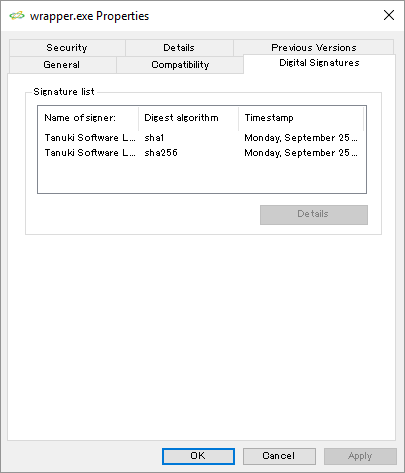
Since Wrapper version 3.5.34, the Wrapper binaries are dual signed
with SHA-1 and SHA-2 hash algorithms to allow stronger verification at the OS level.
To verify algorithms and timestamps, right click on the binaries and open the "Properties" window from the
contextual menu, then select the "Digital Signatures" tab:
Note that the SHA-256 hash algorithm will not appear on old versions of Windows where this algorithm is not supported.
Microsoft published an update
for Windows 7 and Windows Server 2008 R2 to add support for SHA-2.
If this update is present, you will be able to verify the SHA-2 hash, else you will only be able to verify the SHA-1 hash.
More recent versions of Windows don't require this update, as they already support SHA-256,
while older versions (Windows XP, Vista, Windows Server 2008) can only verify SHA-1 hashes.
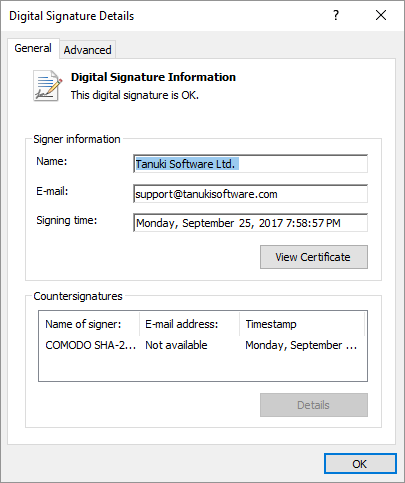
You can confirm that a digital signature is valid by clicking on it in the signature list:
Why is the Wrapper trying to access an external Sectigo server?
The Wrapper itself does not actually try to access the Sectigo or other servers, but starting with Wrapper version 3.5.7,
the binaries are now signed with a Sectigo certificate.
This is important to help the OS verify that the Wrapper binaries are actually from Tanuki Software.
When Windows tries to launch a signed binary, it will first check the binary to make sure that it matches the signature to ensure that the binary has not been tampered with.
Normally the Sectigo certificate needed to verify the binary will exist on a Windows machine, but in some cases the OS will need to go out to the Internet and download it from a known location.
The connection will happen as the Wrapper is being launched, but before it is actually started.
It can appear, however, as if the Wrapper is what is making the connection.
We have had reports of the following servers being accessed in this way: ocsp.comodoca.com, a125-56.204-123.deploy.akamaitechnologies.com (The IP portion of the akamai servers vary by the request).
If this causes any concern with customers, then one option on the Standard and Professional editions is to Customize your Wrapper binary, as this process removes the signature.
Doing so will, of course, remove the OS's ability to verify the authenticity of the binary, however.
I can only run -N- services on Windows.
The Wrapper itself does not place any restrictions on the number of Wrapper instances
that can be run on Windows at the same time, but both the Wrapper and especially Java
consume various resources, which can place limits on how many instances can be run on
a given system. The most common resource that causes problems is the Desktop Heap.
Please see the Solving Desktop Heap Problems
page for more information.
How can I specify new Java 9 options that require arguments (such as those used to specify modules)?
Java 9 introduces several options (such as --module-path or --add-modules) that require to be specified with an argument.
Usually the argument is separated from the option name by a space, but any space inside values of the wrapper.java.additional.<n>
properties is interpreted as part of the argument value and not as delimiter.
A solution is to separate the option name and the argument by an equal sign (=) instead of a space.
Note that this will only work with long options (those starting with '--') and not with their short aliases.
For example, '-p=<PATH>' is not allowed ('-p' being an alias of '--module-path').
Another solution that allows you to use both spaces and short aliases, is to use the JDK_JAVA_OPTIONS environment variable.
The content of this variable will be added to the options of the command line by the JVM.
You can set it from the Wrapper configuration file by using the following syntax:
Note, however, that you will not be able to visualize the content of JDK_JAVA_OPTIONS when printing the Java command line (using the
wrapper.java.command.loglevel property) as it is only parsed by the JVM when it is launched.
You can read more information about the long options and the JDK_JAVA_OPTIONS variable on Oracle's website.
How can I solve slow startup times on Linux due to random seed generator?
Java applications that make calls to java.util.Random.nextLong() or other random methods can be very, very slow the first time they are called.
This is caused by a lack of entropy on the system. The call will block until such entropy has build up enough to return a good number.
Unfortunately, on startup when nothing else is happening, this can take a very long time, during which your application will appear to be frozen.
About the only way to detect whether or not this is happening is to issue a thread dump request while it is waiting.
If this is the cause, you should be able to see it easily.
Once this has been identified as the problem, a solution that we have found is to add the following property to your configuration.
This changes the way Java generates random data to a method that is always fast.
We make no claims on how this affects security, so please investigate this and let us know if you have a better solution.
Be sure to use a number which does not overlap with your existing configuration:
# Solve slow random initialization on Linux
wrapper.java.additional.20=-Djava.security.egd=file:/dev/./urandom
This is a platform-specific solution.
If you need to have a platform-independent configuration, then please create a second wrapper-linux.conf configuration file:
#encoding=UTF-8
# Solve slow random initialization on Linux
wrapper.java.additional.20=-Djava.security.egd=file:/dev/./urandom
Then, include that based on platform from your main configuration file.
In such cases, we suggest adding a comment in the main configuration to make sure the numbered property is not reused by mistake.
#encoding=UTF-8
#include ../conf/wrapper-%WRAPPER_OS%.conf
...
# Solve slow random initialization on Linux
#wrapper.java.additional.20= # Reserved for use in wrapper-linux.conf
Old issues
I get an error about not being able to write a pid file when starting the Wrapper.
Starting with Wrapper version 3.0.5,
the wrapper.pidfile property
was implemented on the Windows platform.
Previous versions of the Wrapper ignored this property when running under Windows.
However, if the wrapper.conf file
that you are using was created using a version of the Wrapper versions prior to 3.0.0,
then you may have this property defined as a holdout from
when you copied the file from the example wrapper.conf.
This will lead to an error like the following:
ERROR: Could not write pid file /var/run/testwrapper.pid: The
system cannot find the path specified. (0x3)
Most of the features of the Wrapper prior to version 3.4.x will work with version 1.2.x of JVMs.
However, the released version of the Wrapper is built using a 1.4.x version of Java.
1.2.x versions of the JVM have problems with the generated jar and will crash with very low level JNI errors.
This appears to be a bug in the JVM 1.4.x versions of the compiler,
as it happens even if the JVM version 1.1 target is specified when compiling the classes.
Here is an example of the errors that I have seen:
A nonfatal internal JIT (3.10.107(x)) error 'chgTarg: Conditional' has occurred in:
  'org/tanukisoftware/wrapper/WrapperManager.stopCommon (II)V': Interpreting method.
  Please report this error in detail to http://java.sun.com/cgi-bin/bugreport.cgi
We get help from several people to be able to produce the releases for all of the various supported platforms
and it is not really possible to force everyone to use old JDKs to build the Wrapper distributions.
If you are experiencing crash problems with JVMs 1.2.x versions and the Wrapper,
please try downloading a source distribution
and building the wrapper.jar file using your JDK 1.2.x version.
This will fix the problem.
If you are running into this, please post a note to the
Wrapper-User Mailing List.
We are not sure how many people are still using 1.2.x JVMs,
but if it is still fairly common, we may reconsider the above policy
and look into what it will take to get the releases built using an older JVM.
My JVM is sometimes restarted when the system is heavily loaded.
As of Wrapper version 3.1.0, a new timer mechanism was added, which allows
the Wrapper to handle cases where it is running in a CPU-starved state reliably because the tick count is incremented at
a rate that reflects the amount of CPU being received, rather than being absolute. This means that timeouts due to high
loads are very unlikely. Just make sure that the wrapper.use_system_time
property is set to FALSE for the timer mechanism to be enabled.
Because the Java Service Wrapper is using a pinging mechanism to check on the health of the JVM,
it is possible that the Wrapper will think that the JVM is hung
when it isn't if another process is taking 100% of the CPU for longer than 30 seconds.
This will result in an entry similar to the following in your log file, and the JVM being restarted:
jvm 1    | 2001/12/01 12:23:23 | start()
wrapper  | 2001/12/01 12:23:44 | Startup failed: Timed out waiting for signal from JVM.
wrapper  | 2001/12/01 12:23:44 | JVM did not exit on request, terminated
wrapper  | 2001/12/01 12:23:49 | Launching a JVM...
jvm 2    | 2001/12/01 12:23:50 | Initializing...
The property wrapper.ping.timeout=30
in conf/wrapper.conf can be used to extend this timeout.
But be aware that this will also lengthen the amount of time
that your application will remain hung in the event of a real problem.
I can't start the Wrapper on MacOS Mavericks.
Up until Wrapper version 3.5.22, if you start the Wrapper on MacOS Mavericks, you will see an error.
This is because the script fails to use the 64-bit version of the binaries.
The solution to this issue is to locate, open and edit the following script file src/bin/App.sh.in (on older Wrapper versions, this file was named 'sh.script.in').