Index |
|
wrapper.logfile |
||||||||||||||||
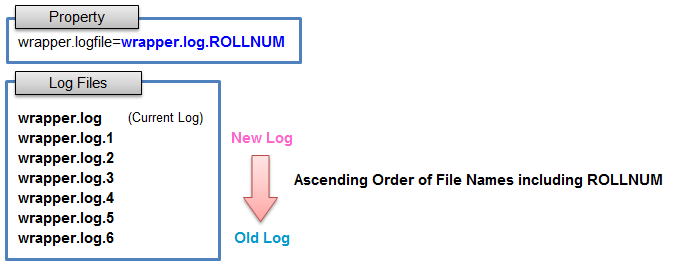
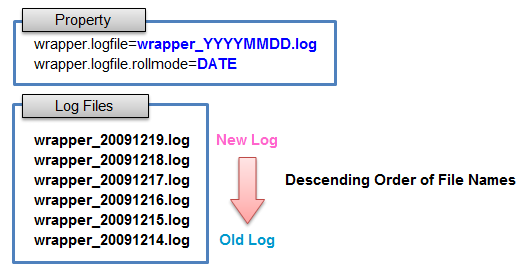
Sets the path to the log file where all output from the Wrapper and from the Java Application will be logged.
For further information about "rolling mode of log file", "output format of log file", and "log level of log file", please review the description of each property. Default:
If this property is absent, or if the Wrapper is unable to write at the specified location (e.g because of a permission issue),
then the messages will be logged to a default log file named "wrapper. Starting from version 3.5.30, the Wrapper has the ability to resume logging into the log file when it becomes available again. The following diagram represents the fall back and resume mechanisms: 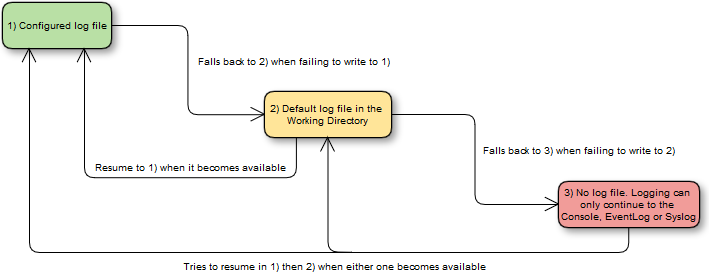
Logging Disable: Setting the property to a blank value will cause file logging to be disabled.
NOTEIn versions 3.5.31 to 3.5.34, the Wrapper contains a bug which causes to use the default log file instead of disabling file logging when a blank value is specified. A better practice to disable output to the log file, and which works with all versions of the Wrapper above 2.2.5, is to set wrapper.logfile.loglevel to NONE.
|


wrapper.logfile.group |
||||||||
You can set "group" for this file.
See the wrapper.
|

wrapper.logfile.umask |
||||||||
You can set "umask" on this file.
See the wrapper.
|
Reference: logfile |
|